Spine Benchmark
Production workbench for Spine analysis and optimization, plus Spinefolio embeds for demos and technical blog content.
Spine Benchmark
Spine Benchmark is a production workbench for Spine pipelines. It combines runtime diagnostics, optimization workflows, and publishing readiness into one operating surface.
Primary tool endpoint: https://spine.schmooky.dev
Why Providers Use It and What They Gain
| Why providers adopt it | What they gain |
|---|---|
| Late-stage performance surprises are expensive | Earlier risk visibility before assets hit production builds |
| Animation review is often subjective | Objective scoring and measurable deltas across revisions |
| Teams spend too much time reproducing issues | Shared diagnostics that align animators, tech art, and frontend engineering |
| Runtime constraints vary per platform and device | Clear bottleneck attribution by structural, compute, render, and packaging class |
| Asset pipelines drift over time | Repeatable pre-release quality gate for every export cycle |
What Providers Gain by Team
| Team | Immediate gain | Strategic gain |
|---|---|---|
| Animation | Clear visibility into costly rigs and attachments | Faster iteration with fewer late reworks |
| Tech Art | Priority map for mesh, constraint, and atlas cleanup | Standardized optimization workflow across titles |
| Client Engineering | Better control of frame budget risk | Lower probability of post-launch runtime regressions |
| Production | Predictable acceptance criteria for assets | More stable delivery timelines and less firefighting |
How It Works in Pixi Runtime
Spine Benchmark is built around the Pixi renderer and Spine runtime integration model, then instrumented for diagnostics.
Runtime Pipeline
- Asset ingestion normalizes skeleton, atlas, and texture inputs.
- Skeleton state is initialized in runtime context with animation state and skin resolution.
- Frame sampling runs across timeline windows and captures structural and dynamic activity.
- Runtime analyzers classify impact into structural cost, compute cost, render cost, and packaging efficiency.
- Tool views project those findings into targeted workflows, each optimized for a specific decision type.
What Is Observed Per Frame
| Runtime layer | Observed signals | Why it matters |
|---|---|---|
| Skeleton structure | Bone counts, hierarchy depth, slot composition | Predicts baseline transform workload |
| Mesh workload | Vertex density, deformation frequency, weighting complexity | Indicates CPU update and GPU vertex pressure |
| Constraint activity | IK, transform, path, physics usage intensity | Surfaces non-linear compute growth and spike risk |
| Render state behavior | Blend mode transitions, clipping use, batch breaks | Explains draw-call fragmentation and compositing cost |
| Atlas behavior | Region distribution and page locality | Exposes texture-page switching overhead |
Detection Model in Runtime Context
Detection is not limited to static file inspection. It combines static topology with sampled runtime behavior, then maps the combined signal into operational risk.
- Static topology answers: how expensive this asset can become.
- Runtime sampling answers: when and where that expense actually appears.
- Tool-specific lenses answer: which decision gives the fastest and safest improvement.
Tool Surface
Current production tools:
- Benchmark
- Mesh Optimizer
- Physics Baker
- Draw Call Inspector
- Atlas Repack
- Comparison
- Animation Heatmap
- Assets Workspace
Detailed Tool Breakdown
Benchmark
What it detects
- Full-package risk profile across core impact classes.
- Which component class dominates total score pressure.
How it works in runtime terms
- Combines skeleton complexity and sampled animation behavior.
- Applies weighted impact aggregation to produce production-priority ordering.
Main decisions it unlocks
- Whether to ship, optimize, or block for further cleanup.
- Which domain should be touched first: rig, mesh, constraints, or render packaging.
Provider gain
- Fast go or no-go signal before engineering integration cost escalates.
Mesh Optimizer
What it detects
- High-cost mesh groups, dense topology pockets, and deformation-heavy attachments.
How it works in runtime terms
- Correlates mesh structure with active animation windows to locate attachments that repeatedly generate expensive updates.
- Highlights concentration zones where topology cleanup yields outsized frame stability gains.
Main decisions it unlocks
- Which attachments should be simplified first.
- Where weighted mesh usage needs stricter policy.
Provider gain
- Lower vertex pressure and fewer GPU-side stalls in complex scenes.
Physics Baker
What it detects
- Constraint behaviors that produce unstable or costly runtime updates.
How it works in runtime terms
- Profiles dynamic behavior over timeline windows and identifies patterns with high iteration cost or volatility.
- Evaluates where baking preserves visual intent while reducing live constraint solve load.
Main decisions it unlocks
- Which physics segments should be baked versus kept dynamic.
- Which constraints need retuning before release.
Provider gain
- More stable frame time under bursty animation sequences.
Draw Call Inspector
What it detects
- Batch breaks, blend-related state churn, and slot-order patterns that inflate draw calls.
How it works in runtime terms
- Tracks render-state boundaries and maps them to slot and attachment transitions.
- Identifies when compositing structure, not geometry, is the real bottleneck source.
Main decisions it unlocks
- Where to consolidate states and reorder practical layers.
- Which blending patterns should be redesigned for runtime efficiency.
Provider gain
- Cleaner batching and improved GPU throughput on constrained devices.
Atlas Repack
What it detects
- Region fragmentation, poor locality, and page boundaries that increase render switching.
How it works in runtime terms
- Analyzes atlas region distribution against runtime usage adjacency.
- Finds repack opportunities that reduce page-switch frequency in real playback order.
Main decisions it unlocks
- Which texture regions should be grouped.
- Where atlas organization blocks compression and delivery goals.
Provider gain
- Better texture locality, lower switching overhead, and cleaner compression handoff.
Comparison
What it detects
- Regressions and improvements between asset revisions at component-level granularity.
How it works in runtime terms
- Re-runs equivalent detection logic across two versions.
- Produces class-level and total-impact deltas for objective revision acceptance.
Main decisions it unlocks
- Whether a new export is actually better in runtime terms.
- Which changes introduced hidden performance debt.
Provider gain
- Reliable acceptance gate for version-to-version quality control.
Animation Heatmap
What it detects
- Timeline hotspots where runtime activity clusters around specific slots and attachments.
How it works in runtime terms
- Samples movement and activity intensity across frame windows.
- Projects hotspot maps so teams can target frames that drive most cost.
Main decisions it unlocks
- Which animation segments need optimization focus first.
- Where quality can be preserved while cost is reduced.
Provider gain
- Focused optimization with higher return per iteration cycle.
Assets Workspace
What it detects
- Input integrity issues before analysis begins, including source mismatches and packaging inconsistencies.
How it works in runtime terms
- Validates asset set completeness and alignment before any runtime pass.
- Prevents diagnostic noise caused by invalid or incomplete source bundles.
Main decisions it unlocks
- Whether a package is analyzable as-is.
- What must be corrected in export or packaging before reliable scoring.
Provider gain
- Fewer false alarms and cleaner diagnostics downstream.
Detection Taxonomy
To keep diagnostics consistent across all tools, impacts are interpreted in four classes:
| Class | Operational meaning | Typical source |
|---|---|---|
| Structural Cost | Complexity embedded in skeleton design | Bone hierarchy depth, slot density, mesh topology |
| Runtime Compute | Per-frame solve and update load | Constraints, deformation, dynamic evaluation |
| Render Cost | GPU-side state and compositing pressure | Draw calls, blending transitions, clipping |
| Packaging Efficiency | Delivery and texture-page efficiency | Atlas layout, region locality, compression readiness |
System Schema
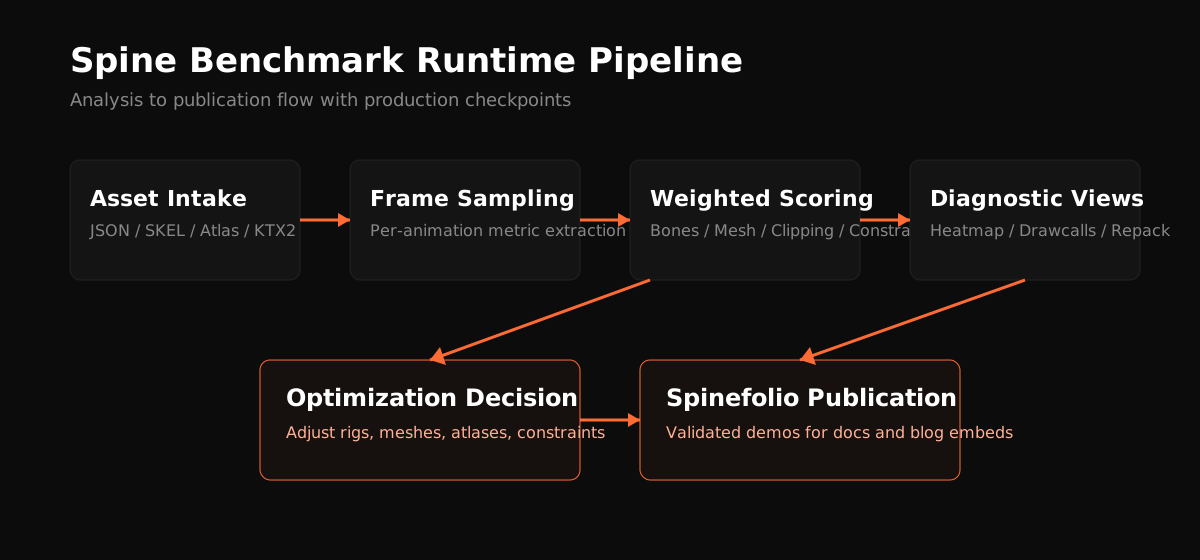
The schema maps the operational sequence from ingestion to publication and highlights the decision nodes with the largest production impact.
Plot: Scoring Weight Distribution
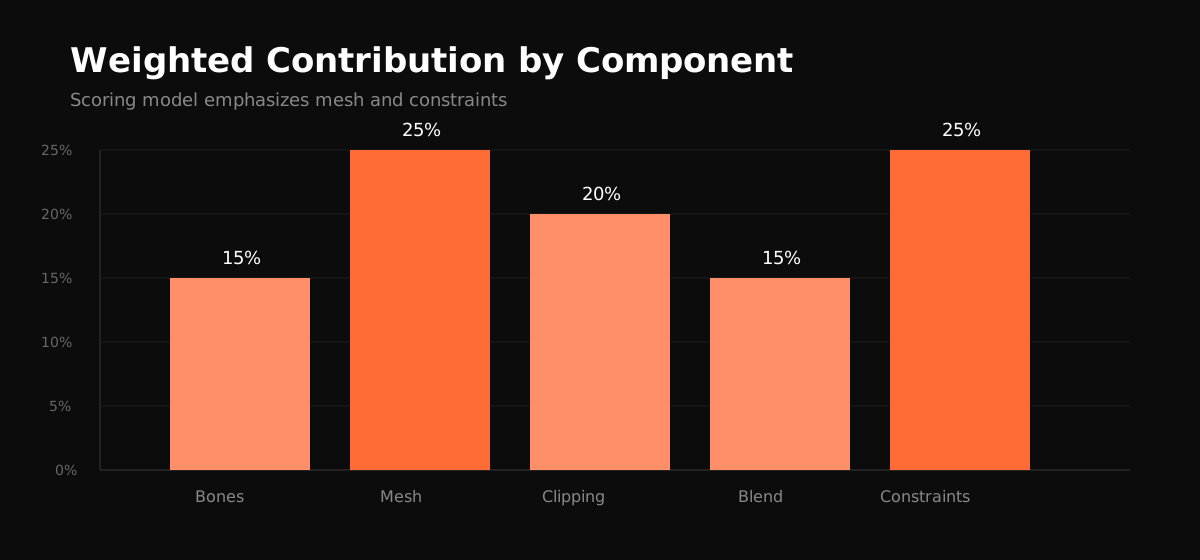
This weighting model prioritizes mesh and constraint pressure because they most often drive real runtime instability.
Plot: IK Constraint Impact Growth
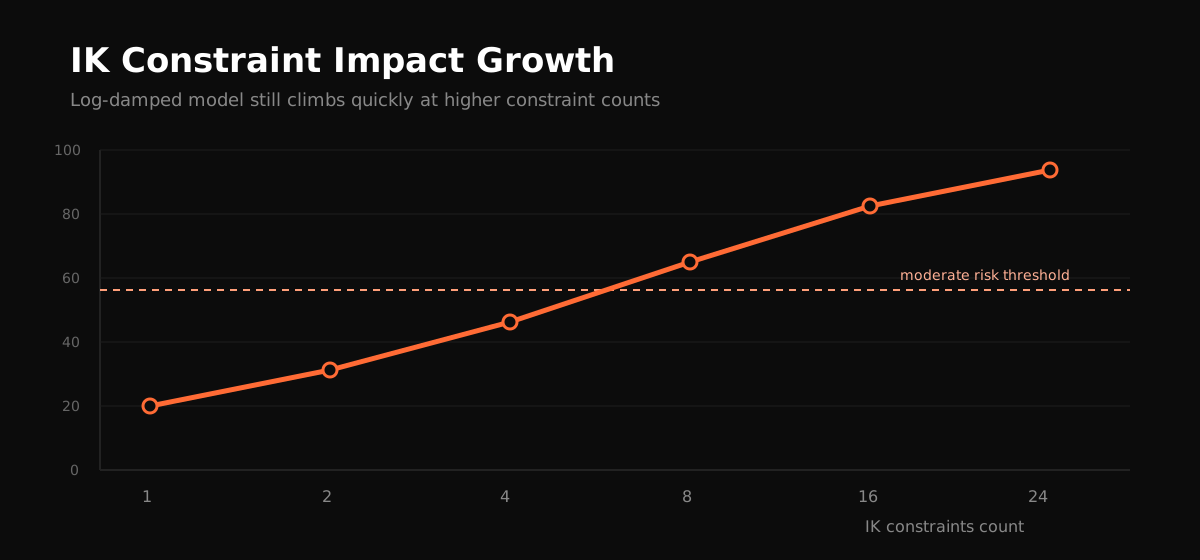
Even with damping, constraint pressure rises quickly at higher counts, which is why proactive constraint governance is treated as a release requirement.
Slot Providers Using Spine Benchmark (Fill In)
- Provider 01 — title or studio, usage notes, public reference
- Provider 02 — title or studio, usage notes, public reference
- Provider 03 — title or studio, usage notes, public reference
- Provider 04 — title or studio, usage notes, public reference
- Provider 05 — title or studio, usage notes, public reference
- Provider 06 — title or studio, usage notes, public reference
- Provider 07 — title or studio, usage notes, public reference
- Provider 08 — title or studio, usage notes, public reference
- Provider 09 — title or studio, usage notes, public reference
- Provider 10 — title or studio, usage notes, public reference
Why Teams Continue Using It
- It reduces late integration risk for Spine-heavy content.
- It creates one shared technical language across art and engineering.
- It replaces subjective review with measurable, repeatable diagnostics.
- It connects optimization and publication inside one operational workflow.